
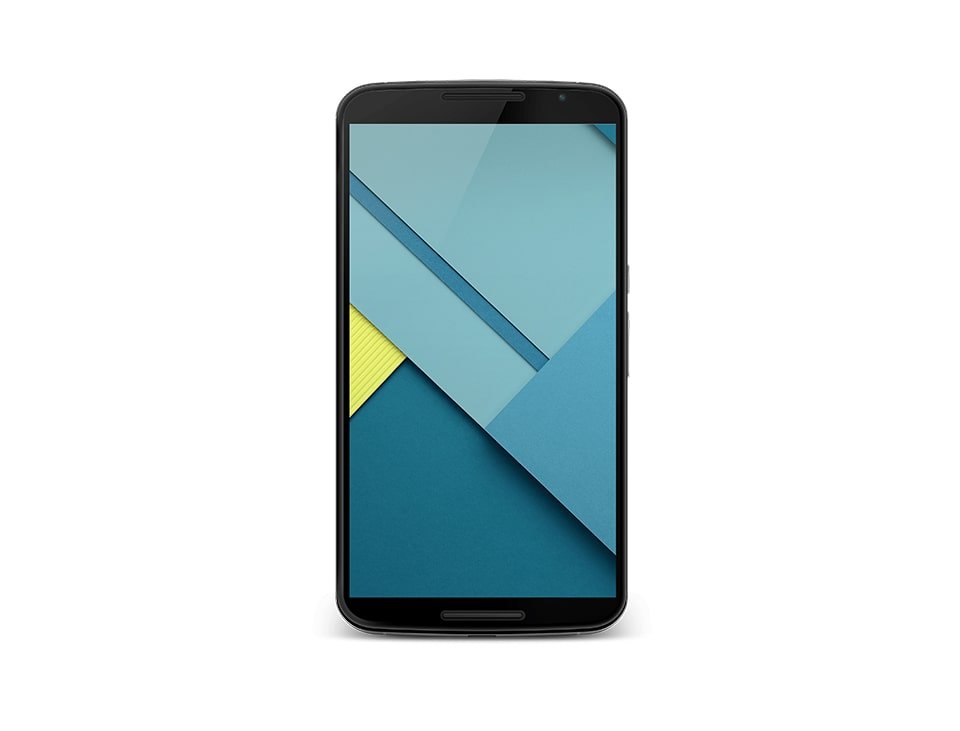
The Google Nexus 6 Definitive Phablet Guide: Mastering the Motorola Shamu Hardware and Software Legacy

The Google Nexus 6, famously codenamed Shamu during its development phase, remains one of the most polarizing and significant entries in the history of the Android ecosystem. Released in late 2014, it marked a monumental shift in Google’s hardware strategy, moving away from the “budget-friendly flagship” identity established by the Nexus 4 and Nexus 5 toward a premium, large-format device designed to compete directly with the iPhone 6 Plus and the Samsung Galaxy Note series. Manufactured by Motorola, the Nexus 6 was essentially a supersized version of the second-generation Moto X, boasting a massive 5.96-inch Quad HD display and front-facing stereo speakers that made it a media consumption powerhouse. Even years after its official support ended with Android 7.1.1 Nougat, the device continues to hold a cult-like status among enthusiasts and collectors.
At the time of its launch, the hardware inside the Nexus 6 was nothing short of cutting-edge. It featured the Qualcomm Snapdragon 805 chipset, which was the pinnacle of 32-bit mobile processing, paired with 3GB of RAM. This combination ensured that the device could handle the then-new Android 5.0 Lollipop and its Material Design interface with fluid precision. However, the sheer physical size of the device—measuring nearly 83mm in width—meant it was not for everyone. It was the first “true” phablet from Google, and it forced users to adapt to a two-handed operation style that has since become the norm in the modern era of massive smartphones. Despite its size challenges, the Nexus 6 introduced several “firsts” for the Nexus program, including water resistance (IPX2-rated splash resistance) and built-in Qi wireless charging.
The legacy of the Nexus 6 is deeply tied to its role as a developer reference tool. Because it was a “pure” Google device, it received updates directly from the source, making it the gold standard for testing new Android features. It was the launch vehicle for Project Volta, Google’s first major attempt at improving battery life through software optimization, and it showcased the potential of computational photography with the introduction of HDR+ on its 13-megapixel Sony IMX214 sensor. While modern smartphones have far surpassed its raw performance, the Nexus 6 remains a benchmark for build quality and display real estate, often cited by fans as the last “truly wide” phone before the industry shifted toward taller, narrower 18:9 and 21:9 aspect ratios.
Detailed Hardware Specifications and Performance Analysis
Under the hood, the Nexus 6 was built to be a “monster” of productivity and entertainment. The Snapdragon 805 SoC utilized a quad-core Krait 450 CPU clocked at a blistering 2.7 GHz, supported by the Adreno 420 GPU. This GPU was a significant step up from its predecessor, offering better thermal management and improved performance for high-resolution gaming. The 5.96-inch AMOLED panel featured a resolution of 2560 x 1440 pixels, resulting in a pixel density of 493 PPI. While AMOLED technology in 2014 was not as bright or color-accurate as today’s LTPO displays, the Nexus 6 offered deep blacks and vibrant colors that made movies and games incredibly immersive. The 3220 mAh battery was considered large at the time, though the high-resolution screen and powerful processor meant that heavy users often struggled to get through a full day without a top-up.
Storage options were limited to 32GB or 64GB of internal eMMC 5.0 flash memory, with no option for microSD expansion—a common point of contention for Nexus fans. Connectivity was robust for the era, featuring Cat 6 LTE, dual-band 802.11ac Wi-Fi with 2×2 MIMO, and Bluetooth 4.1. One of the standout features of the hardware was the inclusion of Motorola’s Turbo Charging technology. Based on Qualcomm Quick Charge 2.0, this allowed the device to gain up to 6 hours of use from just a 15-minute charge, a revolutionary feature that mitigated some of the battery life concerns. The build itself featured a sturdy aluminum frame and a contoured plastic back that, despite the phone’s girth, felt premium in the hand compared to the soft-touch plastic of the Nexus 5.
The audio experience on the Nexus 6 was arguably the best in its class at launch. Unlike many of its competitors that used a single bottom-firing speaker, the Nexus 6 featured dual front-facing stereo speakers. These speakers were exceptionally loud and clear, making the device a favorite for users who frequently watched YouTube or Netflix without headphones. The inclusion of a 3.5mm headphone jack was standard at the time, but the quality of the internal DAC (Digital-to-Analog Converter) was praised for providing a clean signal to high-impedance headphones. In benchmarks like Geekbench 3, the Nexus 6 consistently outperformed contemporary flagships, proving that Google’s optimized software coupled with top-tier silicon was a winning formula for speed and responsiveness.
The Camera Evolution: Sony IMX214 and HDR+
Historically, Nexus devices were criticized for having mediocre cameras. The Nexus 6 sought to change that narrative by employing a 13-megapixel Sony IMX214 sensor with an f/2.0 aperture and Optical Image Stabilization (OIS). This was a significant upgrade over the 8-megapixel sensor found in the Nexus 5. To complement the hardware, Google introduced a unique ring flash—two LEDs embedded into the plastic ring surrounding the camera lens—which provided more even lighting for macro shots and portraits. While the hardware was capable, the real magic happened in the Google Camera app. The Nexus 6 was the first device to truly showcase HDR+ at scale, using burst-mode photography to combine multiple exposures into a single, high-dynamic-range image.
Video capabilities were also advanced for 2014. The Nexus 6 was one of the first mainstream smartphones to support 4K UHD video recording at 30 frames per second. The OIS helped smooth out jitters, though the autofocus system was occasionally prone to “hunting” in low-light environments. For selfie enthusiasts, the front-facing 2.1-megapixel camera was functional but unremarkable, primarily intended for video calls via Hangouts or Skype. Despite the improvements, the camera still lagged slightly behind the Samsung Galaxy Note 4 and the iPhone 6 in terms of shutter speed and low-light noise reduction. However, for a Nexus device, it represented a massive leap forward and set the stage for the industry-leading photography later seen in the Google Pixel lineup.
One of the unique aspects of the Nexus 6 camera was its simplicity. The stock Android camera app lacked the manual controls found on LG or Samsung devices, adhering to Google’s philosophy of “point and shoot.” Over time, third-party developers unlocked additional capabilities through the Camera2 API, allowing for manual ISO, shutter speed, and RAW capture. This made the Nexus 6 a favorite among mobile photography enthusiasts who enjoyed tweaking their settings to get the most out of the Sony sensor. Even today, some enthusiasts use ports of the modern Google Camera (GCam) app on the Nexus 6 to squeeze out every bit of detail from the aging hardware, though the lack of modern ISP (Image Signal Processor) features limits the results compared to newer chips.
Software Experience: From Lollipop to Nougat
The software was the primary reason most users purchased a Nexus 6. It was the first device to ship with Android 5.0 Lollipop, which introduced Material Design. This new design language brought bold colors, fluid animations, and a depth-based UI that made the operating system feel more tactile and modern. Lollipop also introduced the ART (Android Runtime) as the default, replacing the aging Dalvik VM, which resulted in significant performance improvements and better app compatibility. The Nexus 6 benefited from a “clean” version of Android, free from carrier bloatware or heavy manufacturer skins like Samsung’s TouchWiz or HTC’s Sense. This purity ensured that the device remained fast even as it aged.
Throughout its lifecycle, the Nexus 6 received several major updates:
- Android 5.1 Lollipop: This update addressed many of the initial bugs found in 5.0, improved stability, and added native support for multiple SIM cards and Device Protection (a theft-deterrent feature).
- Android 6.0 Marshmallow: Introduced “Doze” mode, which significantly improved standby battery life by putting the phone into a deep sleep when not in use. It also brought granular app permissions and Google Now on Tap.
- Android 7.0/7.1.1 Nougat: The final official update for the Nexus 6. It added split-screen multitasking, which was particularly useful on the 6-inch display, and redesigned notifications with “quick reply” functionality.
- Security Patches: Google continued to provide monthly security updates for the Nexus 6 for three years after its launch, ensuring the device remained safe against emerging threats like Heartbleed and Stagefright.
- Custom ROM Support: Due to its unlockable bootloader, the Nexus 6 became a playground for developers. Even after official support ended, communities like LineageOS and Resurrection Remix provided unofficial builds of Android 10, 11, and beyond.
The transition to Android 6.0 Marshmallow was particularly important for the Nexus 6. Before this update, the device suffered from “encryption lag” because Google had forced full-disk encryption by default on Lollipop without hardware acceleration. Marshmallow and subsequent updates optimized this process, making the phone feel snappier. Additionally, the introduction of Doze Mode was a lifesaver for the Shamu, as it helped the 3220 mAh battery last much longer when the device was sitting on a desk. The software longevity of the Nexus 6 is a testament to Google’s commitment to the developer community during that era.
Current Market Status and Legacy Value
As of 2025, the Google Nexus 6 is no longer available for purchase through traditional retail channels. However, it maintains a presence in the secondary market among collectors and developers. Because it was the last Nexus phone to feature a truly wide 16:9 aspect ratio and front-facing stereo speakers in a phablet form factor, it is often sought after by those who prefer that specific ergonomic style. Prices for a used Nexus 6 in good condition typically range from $50 to $100, depending on the storage capacity and battery health. It is important to note that many original units now suffer from “battery swell,” where the aging lithium-polymer cell expands and pushes the back cover off—a known issue with Motorola-built devices of that era.
For those looking to buy a Nexus 6 today, the primary use cases are limited. It can still serve as a dedicated media player, a basic web browser over Wi-Fi, or a legacy testing device for Android app development. However, the lack of 5G support and the inability to run most modern banking or high-security apps (due to the outdated Android version) make it unsuitable as a primary daily driver for most people. Additionally, the 32-bit Snapdragon 805 processor is increasingly unsupported by modern apps that require 64-bit architecture. Despite these limitations, the Nexus 6 remains a piece of mobile history, representing the moment Google decided to go “big” and challenge the premium market.
The “Shamu” also holds a special place in the history of Google’s mobile carrier ambitions. It was the launch device for Project Fi (now Google Fi Wireless). The Nexus 6 featured a unique radio configuration that allowed it to switch seamlessly between T-Mobile and Sprint towers, as well as Wi-Fi networks, using a special SIM card. This made it a pioneer in the MVNO (Mobile Virtual Network Operator) space. The ability to use the Nexus 6 across almost any GSM or CDMA carrier in the United States without a contract was a liberating experience for many users who were tired of the traditional carrier subsidy model.
Current Market Price and Deals
- Refurbished / Used (32GB): $45.00 – $65.00. These are typically found on eBay or Back Market. Ensure the seller mentions the battery has been tested or replaced to avoid the common “reboot at 30%” issue.
- Refurbished / Used (64GB): $70.00 – $95.00. The 64GB Midnight Blue model is the most common variant found in the second-hand market.
- New Old Stock (NOS): $150.00+. Occasionally, factory-sealed units appear on collector sites. These are highly prized but the batteries may be degraded due to years of inactivity.
- Parts Only / Cracked Screen: $15.00 – $25.00. Useful for those looking to harvest the motherboard or the rare front-facing speakers.
- Deals: Look for “bundle” listings that include original Motorola Turbo Chargers, as these 25W bricks are valuable on their own for charging other legacy micro-USB devices.
Pros and Cons
- Pro: Massive Display. The 5.96-inch QHD AMOLED screen remains excellent for viewing photos and documents, offering a wider canvas than most modern “tall” phones.
- Pro: Front Stereo Speakers. The audio quality and volume level from the front-firing speakers are still better than many mid-range phones released today.
- Pro: Build Quality. The aluminum frame and contoured back give it a substantial, high-quality feel that has aged better than the all-plastic Nexus 5.
- Pro: Customization. An incredibly active developer community means you can still find custom kernels and ROMs to play with the latest Android features.
- Con: Ergonomics. It is objectively difficult to use with one hand. Its width makes it uncomfortable for users with smaller hands or those who wear tight clothing.
- Con: Battery Degradation. The original batteries are now over a decade old. Most units require a battery replacement to be remotely usable without being plugged in.
- Con: Outdated Tech. 32-bit architecture and lack of 5G or modern LTE bands mean slow data speeds and app incompatibility in 2025.
- Con: Camera Speed. While HDR+ produces good results, the shutter lag and processing time are painfully slow compared to modern standards.
Pro Tips for Nexus 6 Enthusiasts
If you are planning to restore or use a Nexus 6 in the current year, there are several steps you can take to optimize the experience. First and foremost, replace the battery. Even if the phone looks mint, a fresh 3220 mAh cell will prevent sudden shutdowns and performance throttling. You can find high-quality replacement kits online that include the necessary Torx T3 screwdriver and prying tools. Be careful when removing the back cover, as it is held on by strong adhesive and several plastic clips that are prone to snapping if forced. Once the battery is replaced, you will notice a significant improvement in the phone’s ability to maintain high clock speeds during intensive tasks.
Another pro tip is to unlock the bootloader and install a custom recovery like TWRP. This allows you to flash a light, optimized ROM like LineageOS. Since the official Nougat build is outdated, a custom ROM can bring modern security patches and a more efficient UI to the device. However, avoid “heavy” ROMs with too many features, as the Snapdragon 805 can struggle with modern background processes. Keeping the system lean is the key to maintaining that “Nexus speed.” If you prefer to stay on stock software, consider using a third-party launcher like Nova Launcher to hide the dated system icons and improve navigation speed.
Finally, utilize the Nexus 6 as a secondary media device. Its screen-to-body ratio and stereo speakers make it an excellent dedicated device for reading e-books, controlling smart home appliances, or acting as a high-end alarm clock. By stripping away unnecessary apps and using it primarily over Wi-Fi, you can extend the life of the hardware and enjoy the “Shamu” experience without the frustrations of using it as a primary phone. Also, if you encounter the “back cover peeling” issue, a high-quality Dbrand skin or a slim Spigen case can hold the phone together while adding a fresh aesthetic.
Frequently Asked Questions (FAQ)
Can I still use WhatsApp or Facebook on the Nexus 6?
As of early 2025, many major apps still support Android 7.1.1, but this is rapidly changing. WhatsApp and Facebook frequently update their minimum requirements. If the official Play Store version stops working, you may need to install a custom ROM running a newer version of Android (like Android 10 or 11) to maintain app compatibility. However, the performance will be significantly slower than on a modern device.
Does the Nexus 6 support 5G or VoLTE?
The Nexus 6 does not support 5G networks. It is a 4G LTE device (Cat 6). While it technically supports VoLTE (Voice over LTE) on certain carriers like T-Mobile, many modern networks have updated their whitelists. You may find that the device is restricted to “data only” or struggles to make calls on networks that have fully decommissioned their 3G/2G fallbacks.
How do I fix the “reboot loop” or sudden shutdowns?
This is almost always a hardware issue related to the battery. As the battery ages, it can no longer provide the necessary voltage during high-demand spikes (like opening the camera or using the flash). Replacing the battery usually fixes this. If the phone is stuck in a boot loop at the Google logo, it may be a software corruption issue, which can be fixed by flashing the factory image using the Nexus Root Toolkit or fastboot commands.
Is the Nexus 6 water-resistant?
The Nexus 6 has a “water-resistant” coating applied to its internal components (IPX2). This means it can survive light splashes or being used in the rain for a short period. However, it is not waterproof. It should never be submerged in water, as it lacks the gaskets and seals found in modern IP68-rated devices. Given the age of the glue and materials, any original resistance has likely degraded over time.
What is the best way to charge the Nexus 6?
For the fastest speeds, use a Motorola Turbo Power charger or any Qualcomm Quick Charge 2.0 (or higher) compatible brick. The device will also charge via Qi wireless pads, but this is much slower and generates significant heat. Due to the known battery expansion issues, it is recommended to avoid leaving the phone on a wireless charger overnight, as the excess heat can accelerate battery degradation.
Conclusion
The Google Nexus 6 stands as a monumental landmark in the evolution of the Android smartphone. It was the device that signaled Google’s transition from experimenter to a serious competitor in the premium flagship market. With its massive 6-inch AMOLED display, powerful Snapdragon 805 processor, and pioneering features like Turbo Charging and front-facing stereo speakers, it offered a glimpse into the future of mobile productivity. While its sheer size and high launch price were controversial at the time, it paved the way for the “XL” and “Pro” models we see today. For the enthusiast, the “Shamu” is more than just an old phone; it is a symbol of a time when the Nexus program was at its most ambitious, offering a pure, unadulterated Google experience on a scale never seen before. Whether kept as a collector’s item or used as a secondary media hub, the Nexus 6 remains one of the most iconic devices ever to run the Android operating system.